AWS PrivateLink connectivity
AWS PrivateLink allows you to open a path to Temporal without opening a public egress. It establishes a private connection between your Amazon Virtual Private Cloud (VPC) and Temporal Cloud. This one-way connection means Temporal cannot establish a connection back to your service. This is useful if normally you block traffic egress as part of your security protocols. If you use a private environment that does not allow external connectivity, you will remain isolated.
After creating the PrivateLink endpoint, configure your clients to use it through either private DNS or direct VPCE targeting (single-region Namespaces only).
Requirements
Your AWS PrivateLink endpoint must be in the same region as your Temporal Cloud namespace. If using replication for High Availability, the PL connection must be in the same region as one of the replicas.
AWS Cross Region endpoints are not supported.
Creating an AWS PrivateLink connection
Set up PrivateLink connectivity with Temporal Cloud with these steps:
-
Open the AWS console with the region you want to use to establish the PrivateLink.
-
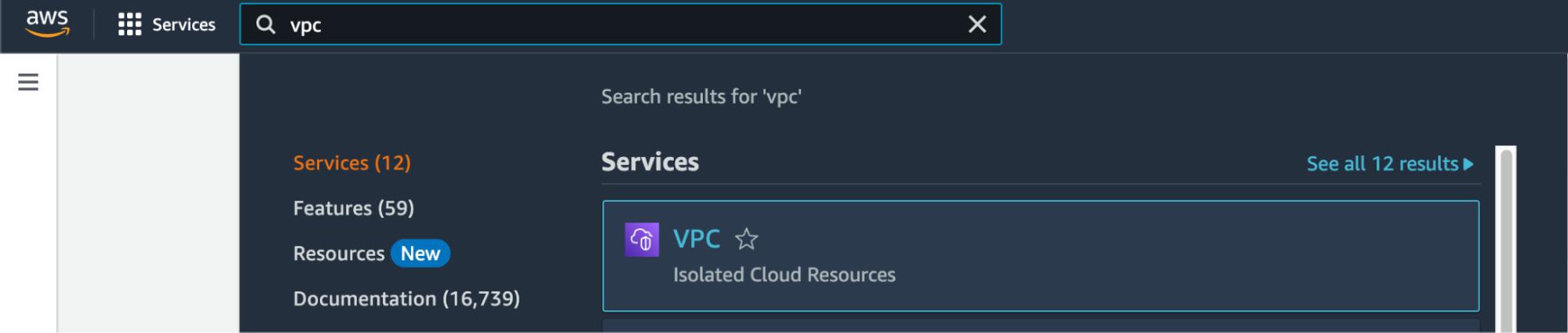
Search for "VPC" in Services and select the option.
-
Select Virtual private cloud > Endpoints from the left menu bar.
-
Click the Create endpoint button to the right of the Actions pulldown menu.
-
Under Type category, select Endpoint services that use NLBs and GWLBs. This option lets you find services shared with you by service name.
-
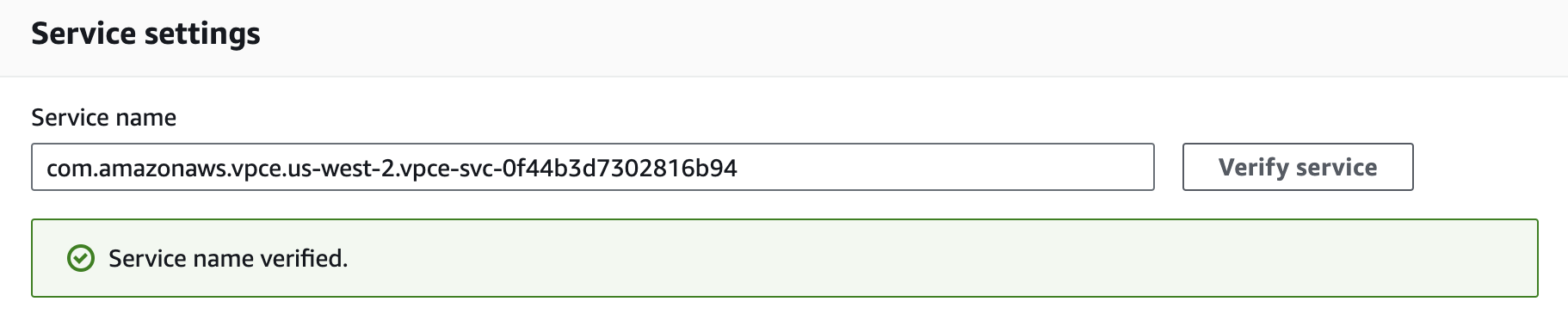
Under Service settings, fill in the Service name with the PrivateLink Service Name for the region you’re trying to connect from:
PrivateLink endpoint services are regional. Individual Namespaces do not use separate services.
-
Confirm your service by clicking on the Verify service button. AWS should respond "Service name verified."
-
Select the VPC and subnets to peer with the Temporal Cloud service endpoint.
-
Select the security group that will control traffic sources for this VPC endpoint. The security group must accept TCP ingress traffic to port 7233 for gRPC communication with Temporal Cloud.
-
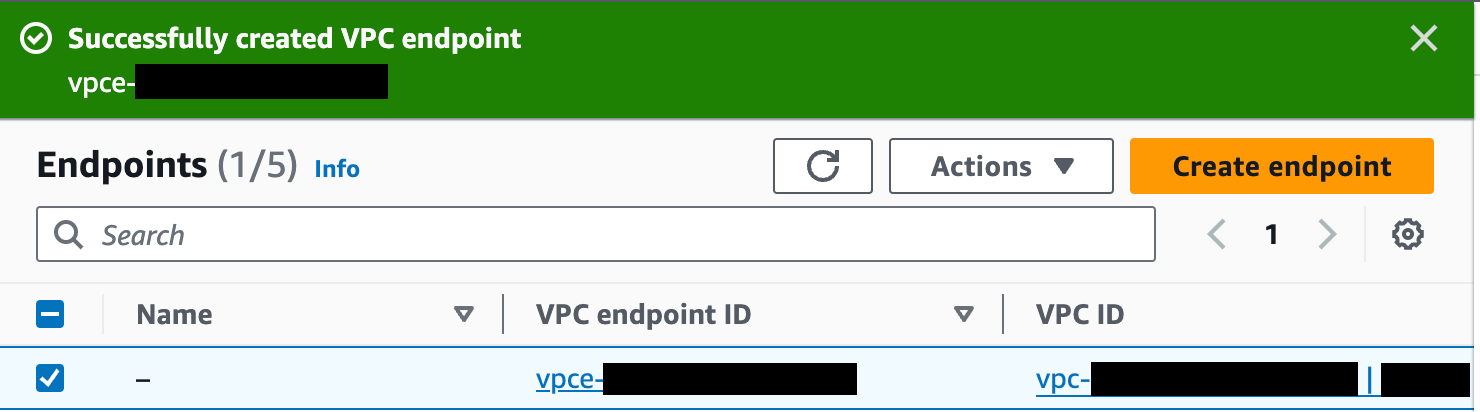
Click the Create endpoint button at the bottom of the screen. If successful, AWS reports "Successfully created VPC endpoint." and lists the new endpoint. The new endpoint appears in the Endpoints list, along with its ID.
-
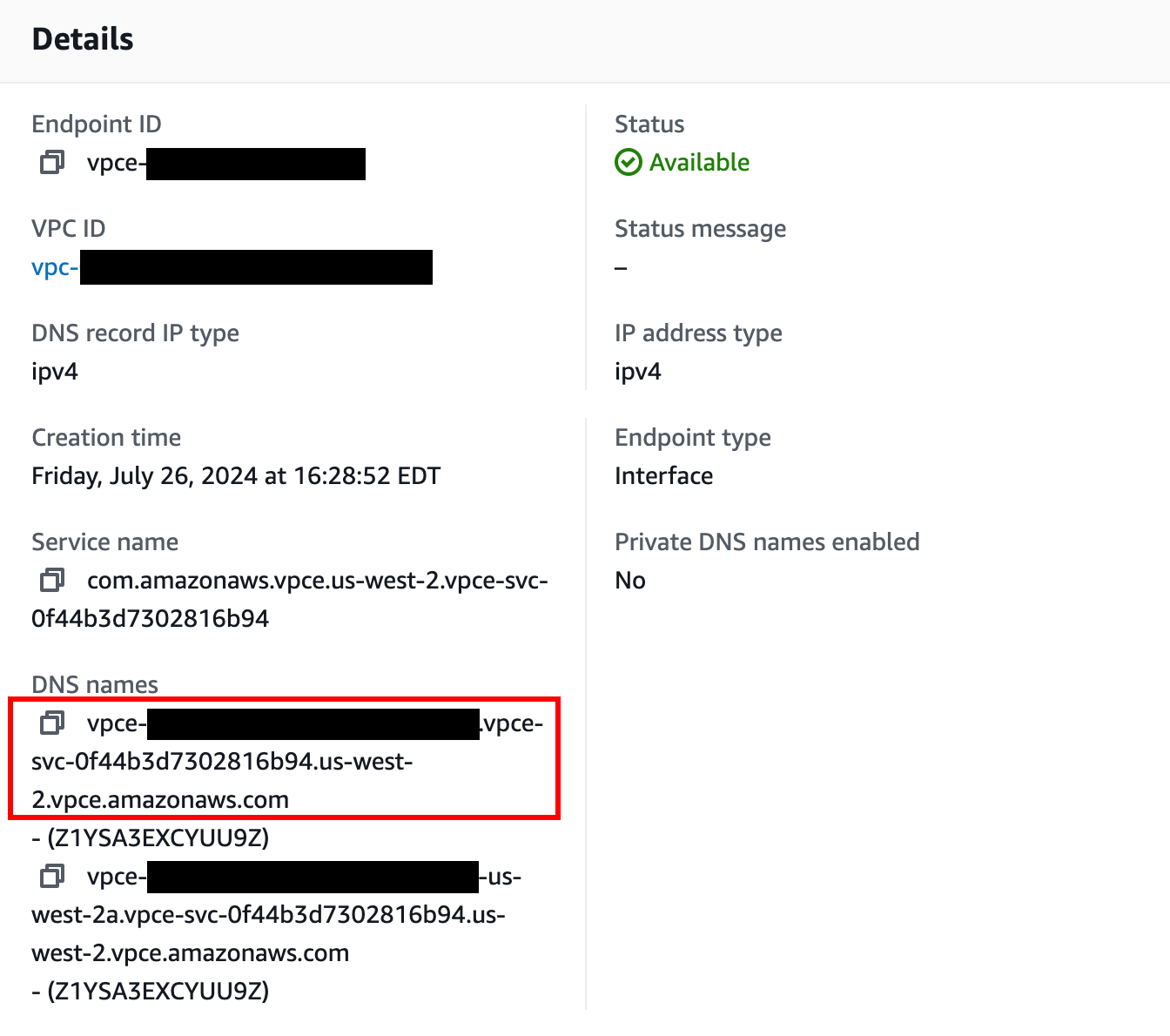
Click on the VPC endpoint ID in the Endpoints list to check its status. Wait for the status to be “Available”. This can take up to 10 minutes.
-
Once the status is "Available", the AWS PrivateLink is ready for use.
The next step is to configure private DNS so your clients can use the PrivateLink connection. For single-region Namespaces that don't need per-Namespace DNS records, you can use direct VPCE targeting instead.
Configuring Private DNS for AWS PrivateLink
Why configure private DNS?
When you connect to Temporal Cloud through AWS PrivateLink you normally must:
- Point your SDKs/Workers at the PrivateLink DNS name for the VPC Endpoint (e.g.,
vpce-0123456789abcdef-abc.us-east-1.vpce.amazonaws.com), and - Override the Server Name Indicator (SNI) so that the TLS handshake still presents the public Temporal Cloud hostname (e.g.,
my-namespace.my-account.tmprl.cloud).
By creating a Route 53 private hosted zone (PHZ) that maps the public Temporal Cloud hostname (or region hostname) to your VPC Endpoint, you can:
- Keep using the standard Temporal Cloud hostnames in code and configuration.
- Eliminate the need to set a custom SNI override.
- Make future Endpoint rotations transparent—only the PHZ record changes.
This approach is optional; Temporal Cloud works without it. It simply streamlines configuration and operations. If you cannot use private DNS, refer to our guide for updating the server and TLS settings on your clients.
Prerequisites
| Requirement | Notes |
|---|---|
| AWS VPC with DNS resolution and DNS hostnames enabled | VPC console → Edit DNS settings → enable both checkboxes. |
| Interface VPC Endpoint for Temporal Cloud | Subnets must be associated with the VPC and Security Group must allow TCP ingress traffic to port 7233 from the appropriate hosts. |
| Route 53 available in your AWS account | You need permission to create Private Hosted Zones and records. |
| Namespace details | Needed to choose the correct override domain pattern below. |
Choose the override domain and endpoint
| Temporal Cloud setup | Use this PHZ domain | Example |
|---|---|---|
| Single-region Namespace with mTLS auth | <account>.tmprl.cloud | payments.abcde.tmprl.cloud ↔ vpce-... |
| Single-region Namespace with API-key auth | <cloud_provider>.api.temporal.io | us-east-1.aws.api.temporal.io ↔ vpce-... |
| Namespace with High Availability | region.tmprl.cloud | aws-us-east-1.region.tmprl.cloud ↔ vpce-... |
Step-by-step instructions
A Route 53 private hosted zone with no records causes DNS resolution to fail (NXDOMAIN) inside any associated VPC. If you create an empty PHZ for <account>.tmprl.cloud and associate it with a VPC where Workers are running, all Worker traffic to Temporal Cloud in that VPC stops until you add the CNAME record. Follow the steps below in order to avoid this.
1. Collect your PrivateLink endpoint DNS name
aws ec2 describe-vpc-endpoints \
  --vpc-endpoint-ids $VPC_ENDPOINT_ID \
  --query "VpcEndpoints[0].DnsEntries[0].DnsName" \
  --output text

# Example output:
# vpce-0123456789abcdef-abc.us-east-1.vpce.amazonaws.com
Save the vpce-*.amazonaws.com value — you will target it in the CNAME record.
2. Create a Route 53 Private Hosted Zone (do not yet attach Worker VPCs)
a. Open Route 53 → Hosted zones → Create hosted zone.
b. Enter the domain chosen from the table above, e.g., payments.abcde.tmprl.cloud.
c. Type: Private hosted zone for Temporal Cloud.
d. Leave VPC associations empty for now (you'll add them in step 4).
e. Create the hosted zone.
3. Add a CNAME record
Inside the new PHZ:
| Field | Value |
|---|---|
| Record name | the Namespace Endpoint (e.g., payments.abcde.tmprl.cloud). |
| Record type | CNAME |
| Value | Your VPC Endpoint DNS name (vpce-0123456789abcdef-abc.us-east-1.vpce.amazonaws.com) |
| TTL | 60s is typical; 15s for Namespaces with High Availability (to minimize recovery time after failover). |
4. Associate the PHZ with your Worker VPCs and verify
Now that the record exists, associate the PHZ with every VPC that contains Temporal Workers or SDK clients (Route 53 → your zone → Edit settings → Add VPC).
We strongly recommend that you test with a non-production VPC first. Attach the PHZ to a non-production VPC, validate end-to-end resolution and connectivity from a host in that VPC, and only then attach production Worker VPCs. This catches misconfigured records before they affect production traffic.
Verify DNS resolution from inside one of the associated VPCs:
dig payments.abcde.tmprl.cloud
If the record resolves to the VPC Endpoint, you are ready to use Temporal Cloud without SNI overrides.
Updating your workers/clients
With private DNS in place, configure your SDKs exactly as the public-internet examples show (filling in your own namespace):
clientOptions := client.Options{
    HostPort: "payments.abcde.tmprl.cloud:7233",
    Namespace: "payments",
    // No TLS SNI override needed
}
The DNS resolver inside your VPC returns the private endpoint, while TLS still validates the original hostname—simplifying both code and certificate management.
Configure private DNS for Namespaces with High Availability
For Namespaces with High Availability features, you need to override DNS for region.tmprl.cloud so each region resolves to the local VPC Endpoint, and you need to ensure Workers can reach whichever region is active. Failover is transparent to clients only when this is set up correctly.
The complete guidance — including single-cloud (AWS-only) HA, multi-cloud HA (AWS PrivateLink + GCP Private Service Connect), and a recommended failover-testing plan — lives on a single page: Connectivity for High Availability.
Direct VPCE targeting without per-Namespace DNS
For single-region Namespaces, you can avoid creating DNS records for each Namespace by pointing Workers directly at the VPC Endpoint and overriding the TLS Server Name Indicator (SNI):
- Create the PrivateLink VPC Endpoint (one per region — all Namespaces in that region share it).
- Configure each Worker with:
- Endpoint: the VPC Endpoint DNS name (e.g.,
vpce-0123456789abcdef-abc.us-east-1.vpce.amazonaws.com:7233) - Server name (SNI override): the Namespace Endpoint value (e.g.,
my-namespace.my-account.tmprl.cloud)
- Endpoint: the VPC Endpoint DNS name (e.g.,
With this approach, new Namespaces do not require new DNS records.
This approach does not work for Namespaces with High Availability features. HA Namespaces rely on Temporal's public DNS CNAME records to route traffic to the active region during failover. If you bypass DNS, your Workers cannot follow the CNAME to the new region. For HA Namespaces, use private DNS instead.
Adding PrivateLink from additional AWS accounts
A common pattern is to have separate AWS accounts for different lines of business, environments (staging, production), or compliance scopes (PCI vs non-PCI), each with its own VPC and Workers connecting to the same Temporal Cloud account.
You can create as many AWS PrivateLink VPC endpoints as you need to the same Temporal Cloud regional service — there is nothing to register, approve, or open a ticket for on the Temporal side.
For each additional AWS account or VPC:
- In that account, create the AWS PrivateLink VPC endpoint targeting the regional service name from the regions table — same as in the creation steps above.
- Configure DNS in that VPC. You have two options:
- Create a Route 53 Private Hosted Zone in that account scoped to the appropriate VPC(s), following the private DNS steps above. Each VPC's PHZ should point at the VPC Endpoint local to that VPC.
- Or, use direct VPCE targeting (single-region Namespaces only).
- Optional: if you want to enforce private-only access for a Namespace, add a Connectivity Rule for each VPC endpoint and attach all of them (plus a public rule, if needed) to the Namespace. See Connectivity Rules.
There is no upper limit on the number of VPC endpoints you can connect from your side to a regional PrivateLink service. The default per-account limit on private Connectivity Rules is 50 — contact support if you need to raise it.
Available AWS regions, PrivateLink endpoints, and DNS record overrides
The following table lists the available Temporal regions, PrivateLink endpoints, and regional endpoints used for DNS record overrides:
Asia Pacific - Tokyo (ap-northeast-1)
- Cloud API Code:
aws-ap-northeast-1 - Regional Endpoint:
aws-ap-northeast-1.region.tmprl.cloud - PrivateLink Endpoint Service:
com.amazonaws.vpce.ap-northeast-1.vpce-svc-08f34c33f9fb8a48a - Same Region Replication: Not Available
- Multi-Region Replication:
aws-ap-northeast-2aws-ap-south-1aws-ap-south-2aws-ap-southeast-1aws-ap-southeast-2
- Multi-Cloud Replication:
gcp-asia-south1
Asia Pacific - Seoul (ap-northeast-2)
- Cloud API Code:
aws-ap-northeast-2 - Regional Endpoint:
aws-ap-northeast-2.region.tmprl.cloud - PrivateLink Endpoint Service:
com.amazonaws.vpce.ap-northeast-2.vpce-svc-08c4d5445a5aad308 - Same Region Replication: Not Available
- Multi-Region Replication:
aws-ap-northeast-1aws-ap-south-1aws-ap-south-2aws-ap-southeast-1aws-ap-southeast-2
- Multi-Cloud Replication:
gcp-asia-south1
Asia Pacific - Mumbai (ap-south-1)
- Cloud API Code:
aws-ap-south-1 - Regional Endpoint:
aws-ap-south-1.region.tmprl.cloud - PrivateLink Endpoint Service:
com.amazonaws.vpce.ap-south-1.vpce-svc-0ad4f8ed56db15662 - Same Region Replication: Not Available
- Multi-Region Replication:
aws-ap-northeast-1aws-ap-northeast-2aws-ap-south-2aws-ap-southeast-1aws-ap-southeast-2
- Multi-Cloud Replication:
gcp-asia-south1
Asia Pacific - Hyderabad (ap-south-2)
- Cloud API Code:
aws-ap-south-2 - Regional Endpoint:
aws-ap-south-2.region.tmprl.cloud - PrivateLink Endpoint Service:
com.amazonaws.vpce.ap-south-2.vpce-svc-08bcf602b646c69c1 - Same Region Replication: Not Available
- Multi-Region Replication:
aws-ap-northeast-1aws-ap-northeast-2aws-ap-south-1aws-ap-southeast-1aws-ap-southeast-2
- Multi-Cloud Replication:
gcp-asia-south1
Asia Pacific - Singapore (ap-southeast-1)
- Cloud API Code:
aws-ap-southeast-1 - Regional Endpoint:
aws-ap-southeast-1.region.tmprl.cloud - PrivateLink Endpoint Service:
com.amazonaws.vpce.ap-southeast-1.vpce-svc-05c24096fa89b0ccd - Same Region Replication: Not Available
- Multi-Region Replication:
aws-ap-northeast-1aws-ap-northeast-2aws-ap-south-1aws-ap-south-2aws-ap-southeast-2
- Multi-Cloud Replication:
gcp-asia-south1
Asia Pacific - Sydney (ap-southeast-2)
- Cloud API Code:
aws-ap-southeast-2 - Regional Endpoint:
aws-ap-southeast-2.region.tmprl.cloud - PrivateLink Endpoint Service:
com.amazonaws.vpce.ap-southeast-2.vpce-svc-0634f9628e3c15b08 - Same Region Replication: Not Available
- Multi-Region Replication:
aws-ap-northeast-1aws-ap-northeast-2aws-ap-south-1aws-ap-south-2aws-ap-southeast-1
- Multi-Cloud Replication:
gcp-asia-south1
Europe - Frankfurt (eu-central-1)
- Cloud API Code:
aws-eu-central-1 - Regional Endpoint:
aws-eu-central-1.region.tmprl.cloud - PrivateLink Endpoint Service:
com.amazonaws.vpce.eu-central-1.vpce-svc-073a419b36663a0f3 - Same Region Replication: Not Available
- Multi-Region Replication:
aws-eu-west-1aws-eu-west-2
- Multi-Cloud Replication:
gcp-europe-west3
Europe - Ireland (eu-west-1)
- Cloud API Code:
aws-eu-west-1 - Regional Endpoint:
aws-eu-west-1.region.tmprl.cloud - PrivateLink Endpoint Service:
com.amazonaws.vpce.eu-west-1.vpce-svc-04388e89f3479b739 - Same Region Replication: Not Available
- Multi-Region Replication:
aws-eu-central-1aws-eu-west-2
- Multi-Cloud Replication:
gcp-europe-west3
Europe - London (eu-west-2)
- Cloud API Code:
aws-eu-west-2 - Regional Endpoint:
aws-eu-west-2.region.tmprl.cloud - PrivateLink Endpoint Service:
com.amazonaws.vpce.eu-west-2.vpce-svc-0ac7f9f07e7fb5695 - Same Region Replication: Not Available
- Multi-Region Replication:
aws-eu-central-1aws-eu-west-1
- Multi-Cloud Replication:
gcp-europe-west3
North America - Central Canada (ca-central-1)
- Cloud API Code:
aws-ca-central-1 - PrivateLink Endpoint Service:
com.amazonaws.vpce.ca-central-1.vpce-svc-080a781925d0b1d9d - Regional Endpoint:
aws-ca-central-1.region.tmprl.cloud - Same Region Replication: Not Available
- Multi-Region Replication:
aws-us-east-1aws-us-east-2aws-us-west-2
- Multi-Cloud Replication:
gcp-us-central1gcp-us-west1gcp-us-east4
North America - Northern Virginia (us-east-1)
- Cloud API Code:
aws-us-east-1 - Regional Endpoint:
aws-us-east-1.region.tmprl.cloud - PrivateLink Endpoint Service:
com.amazonaws.vpce.us-east-1.vpce-svc-0822256b6575ea37f - Same Region Replication: Available
- Multi-Region Replication:
aws-ca-central-1aws-us-east-2aws-us-west-2
- Multi-Cloud Replication:
gcp-us-central1gcp-us-west1gcp-us-east4
North America - Ohio (us-east-2)
- Cloud API Code:
aws-us-east-2 - Regional Endpoint:
aws-us-east-2.region.tmprl.cloud - PrivateLink Endpoint Service:
com.amazonaws.vpce.us-east-2.vpce-svc-01b8dccfc6660d9d4 - Same Region Replication: Not Available
- Multi-Region Replication:
aws-ca-central-1aws-us-east-1aws-us-west-2
- Multi-Cloud Replication:
gcp-us-central1gcp-us-west1gcp-us-east4
North America - Oregon (us-west-2)
- Cloud API Code:
aws-us-west-2 - Regional Endpoint:
aws-us-west-2.region.tmprl.cloud - PrivateLink Endpoint Service:
com.amazonaws.vpce.us-west-2.vpce-svc-0f44b3d7302816b94 - Same Region Replication: Available
- Multi-Region Replication:
aws-ca-central-1aws-us-east-1aws-us-east-2
- Multi-Cloud Replication:
gcp-us-central1gcp-us-west1gcp-us-east4
South America - São Paulo (sa-east-1)
- Cloud API Code:
aws-sa-east-1 - Regional Endpoint:
aws-sa-east-1.region.tmprl.cloud - PrivateLink Endpoint Service:
com.amazonaws.vpce.sa-east-1.vpce-svc-0ca67a102f3ce525a - Same Region Replication: Not Available
- Multi-Region Replication:
- None
- Multi-Cloud Replication:
- None